MealMaster - Recipe Keeper
- 3.9
- Rating
- 10.00K
- Installs
- Free
- Price
 Analysis by App-foxy
I like recipe apps that solve a specific kitchen problem instead of trying to become a social network, shopping service, and cooking school all at once. MealMaster - Recipe Keeper takes a more practical route: it focuses on making recipes, keeping them in one place, and adjusting quantities when the number of people changes. After spending time with it, I see it as a useful tool for cooks who often adapt meals rather than follow a recipe exactly as written.
It is a free Food & Drink app from Tikamori, rated for Everyone, and it has passed the stage of being a completely unknown download, with over ten thousand installs. Its average rating sits at 3.9 from more than a hundred ratings, which feels consistent with my experience: the core idea is handy, but the app rewards users who build a simple routine around it rather than expecting a polished, fully automated kitchen assistant.
How MealMaster fits into an everyday cooking routine
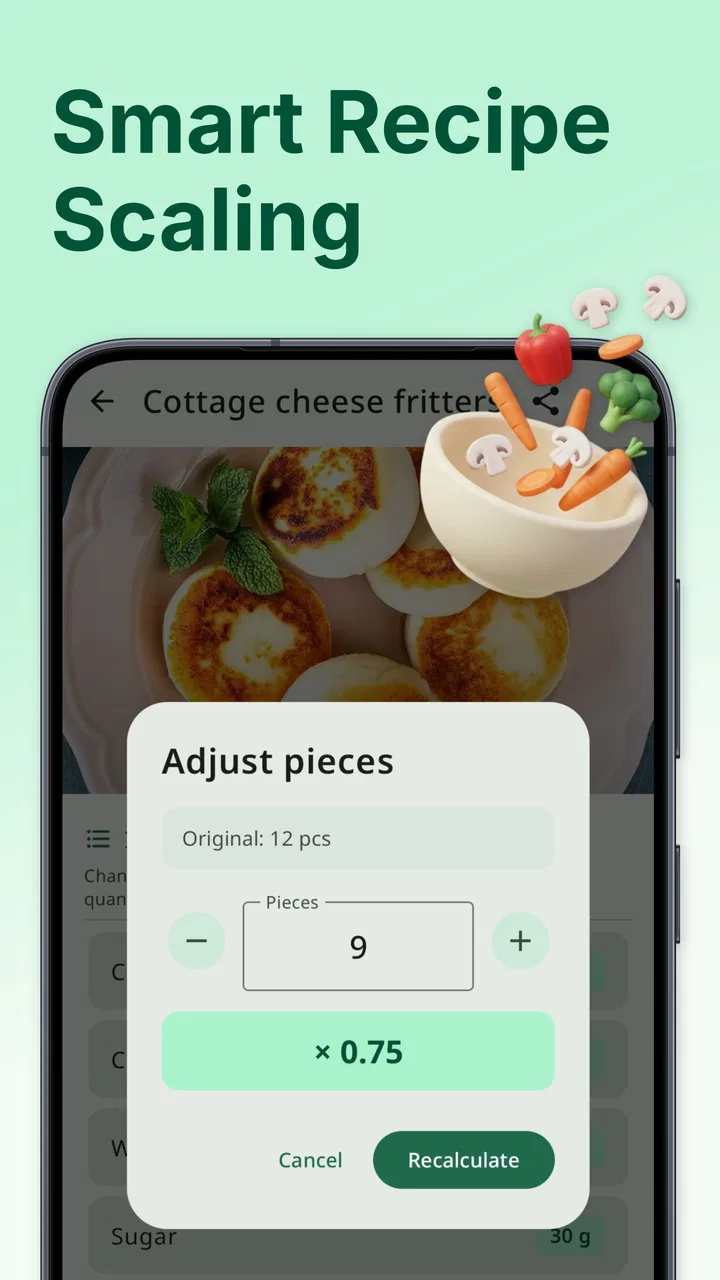
The basic workflow is easy to understand. I can start with a recipe, enter its ingredients and quantities, and keep that information available for later. The useful part is not merely storing another list of ingredients. The real benefit appears when I need to change the serving size or convert measurements without doing the arithmetic on paper.
You May Also Like

 AccuWeather: Weather Radar
AccuWeather Review: A Quick, Clear Forecast for Everyday Decisions
For everyday plans, the best forecast is the one you can understand quickly. AccuWeather makes rain timing, radar, and local conditions easy to act on, with a few trade-offs.

 Hill Climb Racing
Why Hill Climb Racing Still Turns Crashes Into One More Run
A tiny car, a bumpy hill and one more upgrade: Hill Climb Racing keeps resurfacing because its simple chaos makes every near-miss feel personal.

 AliExpress - Shopping App
AliExpress Makes Global Shopping Feel Personal, but Shoppers Bear the Risk
AliExpress turns a global marketplace into a pocket-sized discovery engine. Its reach is useful, its shopping loop compelling, and its trade-offs easy to miss.

 Lords Mobile: Kingdom Wars
Lords Mobile Is a Kingdom-Building Routine, Not a Quick Match
A case-by-case verdict on the building, battles, device demands, and social commitments that make Lords Mobile rewarding for some players and exhausting for others.

 PDF Scanner app - TapScanner
TapScanner Makes Paperwork Easier to Capture, Check, and Share
TapScanner makes scanning with a phone feel less like a rescue operation and more like a dependable step in getting work done. Its capture tools are useful, though not flawless.

 Block Blast!
 Shows How Much a Puzzle Game Can Leave Out
A quiet grid game shows why puzzle players increasingly value instant clarity, repeatable skill and low-pressure play—and where the genre still needs to catch up.
More From Our News Desk
View All News


A realistic example is a weeknight dinner planned for two people that suddenly needs to feed four. With a conventional note-taking app, I would manually double every ingredient and hope I had not missed a small quantity. With MealMaster, the recipe-calculator approach gives that adjustment a clear place in the workflow. I can treat the original recipe as a base and work from the changed serving count instead of rewriting the entire recipe from memory.
That makes the app especially suitable for people who cook the same meals repeatedly but alter them depending on the occasion. A soup may be prepared in a small saucepan on a normal evening and in a larger pot on the weekend. A baking recipe may need careful scaling, while a salad can be adjusted more casually. Keeping both the recipe and its calculation together is more reliable than keeping one version in a notebook and another in a phone note.
I also found that the app makes more sense when used as a personal recipe cabinet rather than as a source of endless inspiration. If you want professionally photographed dishes, video demonstrations, or a large community sharing ideas, this is not the same kind of product. MealMaster is better when you already have recipes from family, books, handwritten cards, or your own experiments and want a practical way to organize them.
The first useful habit is to enter recipes carefully once, then reuse them. Rushing through the initial setup can create confusion later, particularly when an ingredient is listed with an ambiguous amount or when the recipe mixes units. A few extra moments spent choosing consistent measurements pays off when servings are changed. The calculator is only as dependable as the recipe structure you give it.
What to check before building a large collection
Before adding dozens of dishes, I would test the app with three different recipes: one with simple whole-number quantities, one with fractions or small amounts, and one that serves a noticeably different number of people. This exposes how comfortable the entry and conversion process feels for your own cooking style. It is a better test than adding a huge collection and discovering later that your preferred measurements are awkward to manage.
Settings and input choices deserve attention because recipe calculators are sensitive to small inconsistencies. If the app offers choices for measurement formats or serving information during recipe creation, I would decide on a personal standard and stick with it. For example, keeping liquids in one familiar unit and dry ingredients in another may be more practical than converting everything into a single system. Consistency makes saved recipes easier to read when you are cooking quickly.
I would also check how the app handles the information you normally include in a recipe. Some cooks need only ingredients and quantities, while others rely on preparation notes, substitutions, or step-by-step instructions. MealMaster’s central appeal is its recipe-keeping and calculation role, so it should not automatically be treated as a full cooking journal. If your recipes depend heavily on long explanations, verify that the available entry fields match your needs before moving your entire collection over.
Another sensible check is how you want to name recipes. Names such as “chili” or “pancakes” may be enough at first, but they become less useful when you have several variations. I prefer labels that identify the version, such as a family recipe, a vegetarian adaptation, or a batch intended for freezing. This is not a glamorous feature, but it turns a growing collection into something searchable in your own mind.
The app is free to download, although in-app purchases range from $2.99 to $28.99 per item. That makes it worth deciding early whether the free experience covers your needs before investing time in transferring every recipe. I would begin with a small working set, use the calculator in real meals, and only then consider whether paid options provide enough value for the way I cook.
Because the current version is 13.7 and the minimum operating system is Android 9, the app is aimed at relatively modern Android phones rather than very old devices. That is helpful for compatibility planning, especially if you keep an older phone in the kitchen. I would still install it on the device where I actually cook, since a recipe app is most useful when it is available at the counter rather than only on a primary phone that stays in another room.
Faster patterns for repeat cooking
The quickest way to get value from MealMaster is to stop treating every recipe as a one-time entry. I would create a small group of dependable dishes first: perhaps a breakfast, a family dinner, a side dish, and something that freezes well. These recipes reveal different scaling needs and give the app a practical role immediately. A collection of five useful meals is more valuable than a long list that I never revisit.
For recipes I make often, I would use a repeatable sequence: open the saved recipe, set the intended serving amount, review the converted quantities, and only then begin measuring. That order matters. If I start gathering ingredients before changing the serving size, I can accidentally use the original amount. Making the calculation the first step turns it into a routine rather than an emergency correction.
A second useful pattern is separating “base recipe” thinking from “shopping quantity” thinking. The app can help calculate how much a recipe needs for a chosen number of servings, but I still need to account for package sizes, leftovers, and ingredients already in the cupboard. I would use MealMaster to produce the cooking quantities, then round sensibly when shopping. A calculated amount of an ingredient may be mathematically exact but impractical to buy or measure.
This is particularly important with spices, yeast, sauces, and other ingredients where doubling does not always produce the exact result I want. Scaling is a starting point, not a guarantee that the finished dish will taste identical. I would follow the app’s calculation for the main structure of the recipe, then adjust seasoning gradually during cooking. That distinction is one of the most important ways an experienced cook can use a calculator without becoming dependent on it.
Another efficient habit is creating separate saved versions when a change is permanent. If I repeatedly reduce sugar, replace an ingredient, or use a different pan size, I would not keep editing the only original recipe. I would preserve the base and create a clearly named personal variation if the app’s workflow allows that kind of organization. This protects the original proportions and prevents a temporary experiment from becoming the default by accident.
For family recipes, I would enter the quantities exactly as the recipe is normally prepared before trying to modernize it. Old recipes often contain informal instructions, approximate amounts, or serving assumptions. Recording the original version first gives me a reference point. I can then create a practical adaptation for my own kitchen without losing the connection to the recipe I wanted to preserve.
Where the calculator helps, and where judgment still matters
Serving conversion is most valuable when the recipe is proportion-based. Soups, sauces, grain dishes, marinades, and many simple baked mixtures can be scaled in a straightforward way. The benefit is clear when the original recipe serves an inconvenient number of people and I need a smaller or larger batch without doing mental arithmetic for every line.
However, not every recipe scales perfectly. Cooking time, pan dimensions, oven behavior, and ingredient chemistry can change when a batch becomes much larger or smaller. A cake doubled into a deeper pan may need a different baking approach, even if the ingredient quantities are calculated correctly. MealMaster can reduce the arithmetic, but it cannot replace decisions about equipment, texture, heat, or timing.
Conversions also need a quick common-sense review. A converted quantity may be technically correct but difficult to measure with the tools in my kitchen. I would look for awkward fractions before starting, especially when cooking for children or preparing a recipe where precision matters. If the result is inconvenient, rounding may be sensible for herbs or seasoning, while ingredients such as leaveners deserve more care.
This is one of the app’s genuine trade-offs. A dedicated calculator is more useful than a plain notes app for changing quantities, but it can encourage false confidence if I assume every recipe behaves like a spreadsheet. I regard the calculation as a dependable assistant for proportions, not as a complete cooking decision-maker.
Compared with general recipe websites, MealMaster feels quieter and more personal. Websites are usually stronger for discovering unfamiliar dishes and reading detailed preparation guidance. Compared with a notes app, MealMaster is more focused when serving changes and measurement conversion are central. Compared with a full meal-planning platform, it may feel narrower because its appeal is the recipe itself rather than an entire calendar, grocery workflow, or social feed.
That narrower focus is a strength for some users. I do not have to sort through unrelated recommendations when all I want is the recipe I already trust. It is a weakness for someone who expects the app to plan a week of meals from pantry ingredients or automatically create a complete shopping list. I would choose a broader service for those tasks and use MealMaster alongside it only if the recipe calculator solved a problem the other service handled poorly.
Limits that experienced users should understand
The app’s usefulness depends heavily on how much effort I am willing to put into organizing my own collection. It is not the kind of tool that becomes valuable simply by opening it once. The payoff comes from entering recipes in a consistent format and returning to them often. Users who mostly cook from online recipes and rarely repeat meals may not gain enough from maintaining a separate library.
There is also a difference between saving a recipe and preserving the full experience of cooking it. A short ingredient list can be stored easily, but family techniques often depend on visual cues, timing, and texture. If a recipe says to cook until it looks ready rather than giving a precise time, the app cannot make that instruction more exact. I would keep important personal notes wherever the app’s available recipe structure supports them, but I would not expect it to replace a detailed culinary notebook in every situation.
The purchase range is another reason to approach the app gradually. Free access lowers the barrier to testing it, but paid items can become significant depending on what you choose. I would not pay simply because I had already entered many recipes; I would first identify the specific limitation the purchase solves. That prevents sunk effort from making the decision for me.
People using iOS should pay attention to platform expectations before planning a move. The product details I reviewed identify an Android minimum operating system, so I would treat it primarily as an Android choice and verify the current availability for any other device I intended to use. This matters for households where one person cooks from a phone while another expects to access the same collection elsewhere.
I would also avoid using the app as the only copy of irreplaceable family recipes until I had a backup habit. Even when an app works well, personal recipe collections deserve protection. Keeping important originals in a notebook, document, or another safe place is sensible. That is not a criticism unique to MealMaster; it is simply good practice whenever a digital tool becomes the home for memories and hard-won cooking adjustments.
Who will get the most from it
MealMaster is a good match for home cooks who repeat meals, scale recipes for changing household sizes, and want a more structured alternative to scattered notes. It is also useful for someone building a personal collection from scratch, because the calculator gives each saved recipe an ongoing purpose instead of making the app just a digital drawer.
I can see it working particularly well for a person who cooks for one during the week but hosts friends occasionally. The same recipe can serve different situations without rewriting the ingredient list. It may also suit a parent who regularly adjusts portions, a batch cook who prepares food for several days, or an enthusiastic beginner learning how ingredient quantities relate to serving size.
I would skip it if my priority is discovering new recipes every day, watching guided cooking videos, coordinating a complete grocery order, or sharing meals with a large online community. I would also hesitate if I dislike entering information manually. A recipe app cannot organize a collection I never take the time to build, and a more automated service may be a better fit for someone who wants recommendations rather than record-keeping.
After using it as a focused kitchen tool, I think the best way to approach MealMaster - Recipe Keeper is with modest expectations and a clear plan. Start with a few recipes you genuinely cook, standardize their measurements, test the serving calculator, and notice which conversions still require human judgment. That process shows its strengths quickly without pretending that arithmetic alone can solve every cooking problem.
My final view is positive but selective. The app is not a replacement for a recipe website, a grocery planner, or a detailed cooking course. It is a practical companion for keeping personal recipes usable when portions change. The free starting point makes experimentation easy, while the paid options mean I would evaluate the upgrade on actual daily value rather than enthusiasm alone. For a cook who wants a repeatable system for saving recipes and recalculating servings, it earns a place on the phone. For someone seeking a complete food ecosystem, a broader alternative will be more satisfying.
FAQs for MealMaster - Recipe Keeper
01What is MealMaster - Recipe Keeper used for?
MealMaster - Recipe Keeper is designed to help you collect, organize, and manage recipes in one convenient place. You can save favorite meals, browse your personal recipe library, and keep cooking instructions available while preparing food. It is useful for anyone who wants to replace loose notes, screenshots, or bookmarked web pages with a more organized digital cookbook.
02Can I add my own recipes to MealMaster - Recipe Keeper?
Yes, the app is intended to support personal recipe management, so you can add recipes that you already know or discover elsewhere. Depending on the version and device, entries may include ingredients, preparation steps, cooking times, serving information, photos, and notes. This makes MealMaster practical for preserving family recipes, adjusting dishes, or building a customized collection around your eating habits.
03Does MealMaster - Recipe Keeper work offline?
Your saved recipes may remain accessible without a constant internet connection, which is helpful when cooking in a kitchen with weak Wi-Fi or limited mobile data. However, features that depend on online content, synchronization, account services, advertisements, or external recipe sources may require connectivity. It is best to open the app and confirm that important recipes are available offline before relying on it while traveling.
04Is MealMaster - Recipe Keeper suitable for meal planning and shopping?
The app can be helpful for planning meals because keeping recipes together makes it easier to decide what to cook during the week. Depending on the available tools in your installed version, you may also be able to organize recipes or prepare ingredient information for shopping. Users should review the current feature list, since advanced meal-planning, grocery-list, or scheduling options can vary between releases.
05Is MealMaster - Recipe Keeper free to download and safe to use?
MealMaster - Recipe Keeper may be available as a free download, although some versions can include advertising, optional purchases, or premium features. Before installing, check the official Google Play or App Store listing for pricing, permissions, privacy details, and recent user feedback. As with any recipe app, avoid entering sensitive personal information unless you are comfortable with how the application stores and handles your data.
Pros
- Quickly saves and organizes recipes in one convenient place.
- Useful search tools make finding saved meals simple.
- Supports personal notes and recipe customization.
- Helps keep favorite recipes accessible while cooking.
- Clean layout makes browsing recipes easy for most users.
Cons
- Some useful features may require an in-app purchase.
- Recipe entry can feel time-consuming for large collections.
- Limited sharing options may reduce its usefulness for families.
- Imported recipes may need manual formatting or corrections.
- Cloud backup and syncing may depend on account setup.

MealMaster - Recipe Keeper
Gallery